

Live Transcribe & Sound Notifications – Google App
Cost Free | Platforms App for Android Smartphones
The Live Transcribe app is primarily useful for transcribing a verbal conversation.
Most useful for If you are in a conversation with someone who is deaf or hard of hearing then it may be a useful way to transcribe your voice and they can type a response.
Its key features are
You can use Live Transcribe on your Android device to capture speech and sound and see them as text on your screen.
How do I use the App?
- Tap the Live Transcribe app.
- Make sure that you're connected to the internet.
- Hold your device microphone near the person or sound that you want to capture. The microphone is usually located at the bottom of your device.
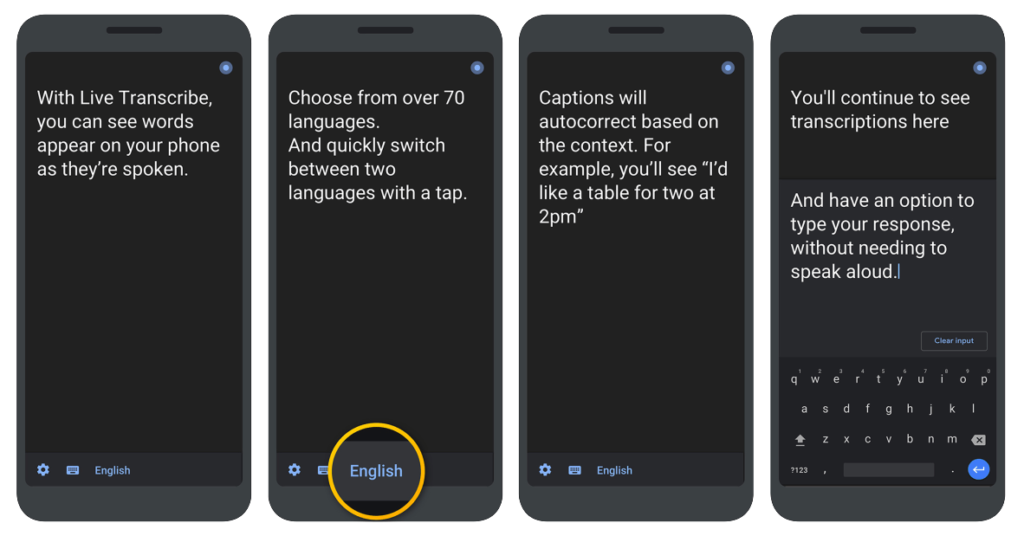
You can type a response instead of speaking during a conversation:
- While Live Transcribe is running, tap ‘Type’.
- Enter text using the on-screen keyboard.
- To return to full-screen, tap Back.
If your conversations often include uncommon words or phrases, you can add them so that they can be transcribed
- While Live Transcribe is running, tap Settings (a cog icon).
- Tap More settings.
- Tap Custom words.
- Tap Add word.
Our Top Tip
Please make sure you have the appropriate permissions to record before you begin using the application in an education or work situation.
Demonstration of Google Live Transcribe in Action
Video source Android YouTube channel
Go to the Google Live Transcribe Website More tips about the Live Transcribe App Link to Google Live Transcribe App
For Further Advice
- If you are a student in Higher Education, speak to your Assistive Technology Officer or Disability Officer / Learning Support Officer.
- If you are a Student in the FET/ETB then it may be possible to speak to an Educational Needs Coordinator, Learning Support Coordinator, Student Access Officer, Student Support Coordinator or a Disability Support Officer for more information about assistive technology.
- If you are an Employee and are interested in this technology then speak to your Disability Liaison Officer (public service) or your Line Manager to start the conversation.
It is quite accurate and the ability to read back on transcripts is very helpful! Also comes in many different languages!